
PowerPoint Gantt chart software for project managers who present the plan.
DeckForge is a web app-based PowerPoint Gantt chart system for building editable timelines, roadmap slides, launch plans, milestones, dependencies, baselines, and executive-ready project updates without redrawing shapes every time the plan moves.
- Web app timeline editor
- PowerPoint-ready Gantt charts
- Dependencies and baselines
- Built for teams and organizations
A real PowerPoint Gantt chart system, not a static template.
DeckForge gives project managers the control of a planning tool and the polish of a PowerPoint timeline. Build the chart in a web app-style editing surface, then use it where stakeholders already expect the update: in the deck.
Plan the work
Create clear project timelines for launches, transformations, delivery plans, and roadmap reviews.
- Tasks, owners, streams, rows, and status labels
- Milestones, flags, phase bands, and launch markers
- Structured dates instead of hand-placed slide shapes
Show the dependencies
Make sequence, risk, and readiness visible in one slide-friendly view.
- Dependency paths between workstreams
- Baseline comparison for plan movement
- Risk and contingency lanes for executive clarity
Present the story
Move from editing to presentation mode when the plan needs to be reviewed, challenged, or approved.
- Clean PowerPoint-style preview
- HTML review export for sharing a chart view
- Consistent layout for recurring status updates
Built for project managers, delivery teams, and organizations that live in PowerPoint.
Many teams already track work somewhere else, but the decision conversation still happens in a deck. DeckForge focuses on that handoff: turning changing project detail into a readable PowerPoint Gantt chart people can understand quickly.
For project managers
Prepare steering updates faster and keep the timeline readable when the plan changes.
- Replace manual shape editing with structured timeline changes
- Explain slippage, readiness, and dependencies on one slide
- Reuse a consistent format across weekly and monthly reviews
For teams
Give product, operations, engineering, and market teams a common visual language for status.
- Group work by stream, owner, phase, or status
- Make handoffs and launch gates visible
- Share a cleaner review view without exposing a noisy planning board
For organizations
Standardize the way programs, launches, and delivery portfolios are shown to stakeholders.
- Create a repeatable project-review format
- Support executive packs, governance reviews, and client updates
- Keep the output aligned with PowerPoint-first communication
For flexible planning
Use DeckForge for more than classic Gantt charts: roadmap views, launch calendars, and readiness plans.
- Roadmaps, transformation plans, go-to-market timelines, and delivery schedules
- Milestone-heavy plans where the story matters as much as the dates
- Presentation mode for review, edit mode for change
Use it wherever a project plan needs to become a slide.
DeckForge is deliberately practical: it helps you build the one-page Gantt chart, timeline, or roadmap that makes a meeting sharper.
Product launches
Track readiness, launch gates, market work, contingency windows, and decision points.
Program delivery
Show workstreams, sequencing, dependencies, baselines, owners, and critical milestones.
Executive updates
Turn complex project movement into a concise view for steering groups and senior leaders.
Client reporting
Create professional timeline slides that make the plan, risk, and next decision easy to see.
Edit like a web app. Present like a PowerPoint slide.
Start from the PowerPoint-style preview, exit presentation mode when you need to edit, then use the timeline controls for tasks, milestones, baselines, dependencies, formatting, import, and export. The result stays clean enough for the meeting and flexible enough for the next change.
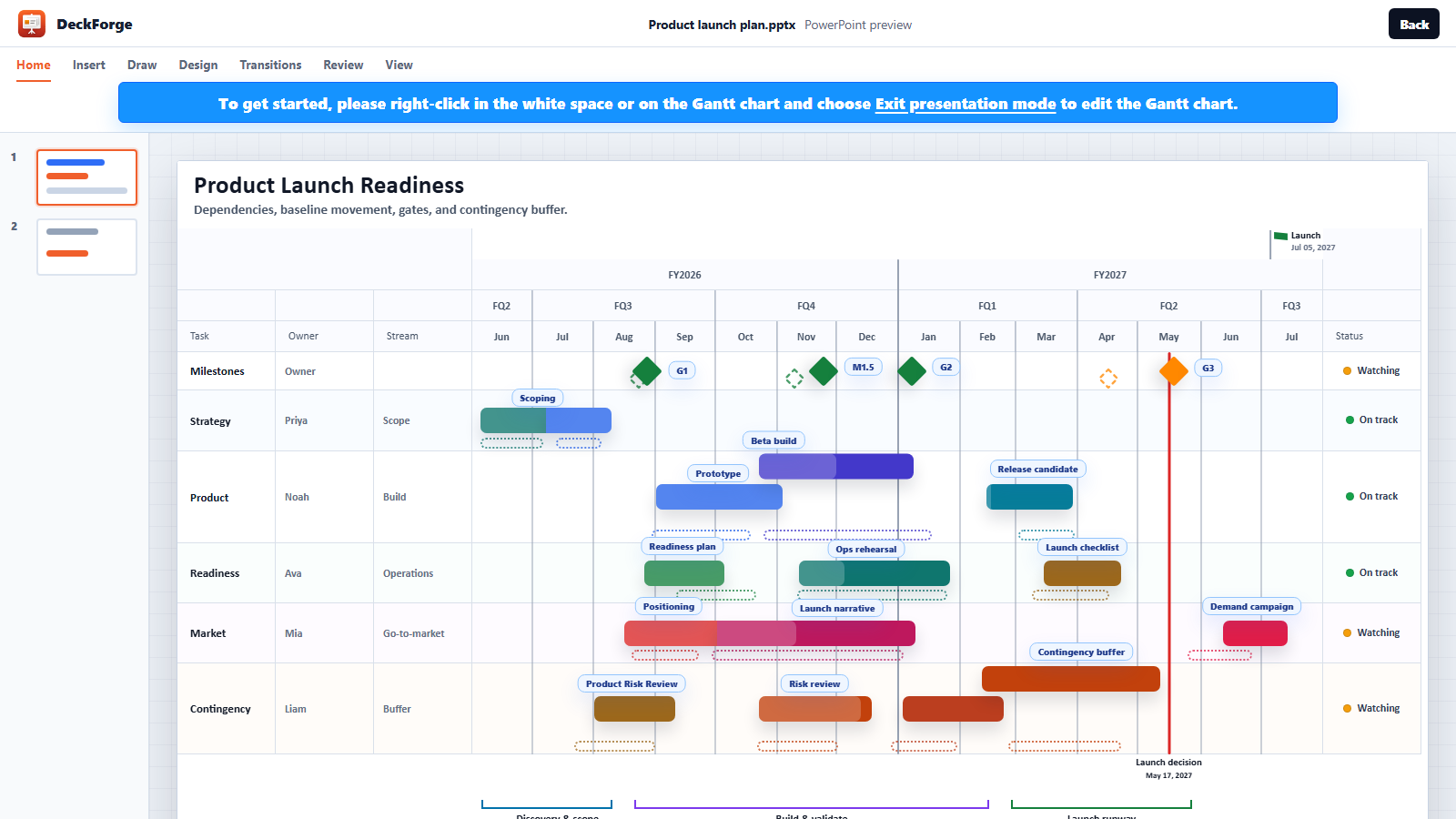
From preview to editable PowerPoint Gantt chart.
The preview opens in presentation mode so the launch plan looks like a finished slide first. To edit, right-click the white chart area or the Gantt chart and choose Exit presentation mode.
1
Try the live product launch preview
Open DeckForge in a PowerPoint-style preview shell and inspect the finished chart view.
Preview
2
Exit presentation mode
Right-click in the white chart area or on the Gantt chart and choose Exit presentation mode.
Edit
3
Shape the timeline
Use the edit tools for tasks, milestones, baselines, dependencies, formatting, import, and export.
Timeline
4
Use it in PowerPoint
Download DeckForge when you are ready to use the web app-based Gantt chart system with PowerPoint.
PowerPoint